GitHub CI/CD Pipeline
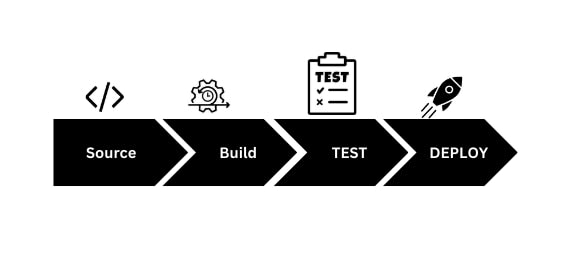
Overview
- It stands for Continuous integration and Continuous Deployment or Delivery.
- Mostly focus on SDLC Development, Testing, Deployment.
- It will get high value once the automation enters into the field.
What is CI/CD Pipeline?
- Pipeline is a software develop process that also know as CI/CD.
- Automate this process will get main objective of this process that is minimize human error and consistent software release.
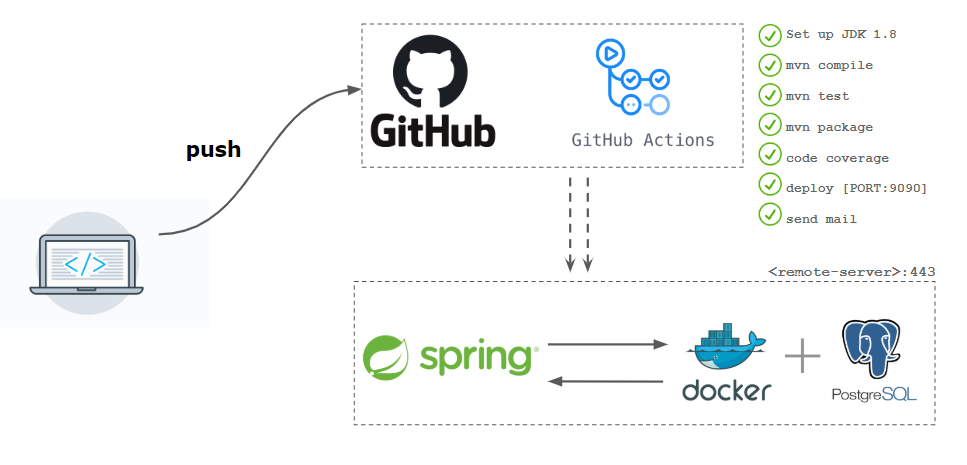
- The pipeline contain,
- compiling the code,
- unit test,
- analyze the code,
- security,
- binaries creation.
- If we containerize the pipeline we also include packaging the code into a container image.
Creating first pipeline
- Need to create the files name with .github inside this folder workflows.
- So git will automatically read all the configurations.
Configuration file
First we need to name the pipeline.
✨ name: name the pipelineTriggering the pipeline is the next step.
on: # This is trigger the pipeline command
  push: *#  once push the code to git pipeline will trigger.*
    branches: *# which branch to trigger.*
     - main
Jobs
Pipeline have tons of job to do once the pipeline is up and running.
- Like Building, Testing, Running.
jobs:
  build-deploy:
    name: Build and Deploy Spring Boot
# Once the pipeline is triggerd ot need to run on one machin
# SO to define this command is used. runs-on
    runs-on: ubuntu-latest
Steps
Step by step jobs will executed.
common syntax look like this
steps:
      - name: Name
        uses: actions
- Copying the codes to the github actions.
actions/checkout@v3.
- Setup JDK to run the java codes.
actions/setup-java@v3.
uses: actions/setup-java@v3
with:
  distribution: 'corretto'
   java-version: 17
- Testing the application. [ using github actions instead commands will help to do the test].
- using maven commands test the application.
run : mvn -B test --file pom.xml
- It will do the test using pom.xml file.
Containerize Pipeline
In order to do this first make the application in jar format using same maven commands.
 run: |  #This will help to run more than one command in a line.
		mvn clean
		mvn -B package --file pom.xml
- Now Build the Docker image using Actions.
uses: docker/build-push-action@v4
uses: docker/build-push-action@v4
        with:
          context: # Dockerfile Location
          dockerfile: Dockerfile
          push: false # after Building the image it'll true
          tags: username/repo:tag # From Docker
- Now Logging into the hub.
- First we need to create the docker secret key from the hub.
uses: docker/login-action@v2
        with:
          username: ${{secrets.DOCKER_HUB_USERNAME}}
          password: ${{secrets.DOCKER_HUB_ACCESS_TOKEN}}
Paste the Docker secret key and the user name in github actions secrets.
username: ${{secrets.DOCKER_HUB_USERNAME}} password: ${{secrets.DOCKER_HUB_ACCESS_TOKEN}}.
- Push : Pushing the image.
uses: docker/build-push-action@v4
        with:
          context: # Dockerfile Location
          dockerfile: Dockerfile
          push: true
          tags: username/repo:tag # From Docker
Now it will up to the hub and can sharable to any one.
Comments
Post a Comment